Building a static site generator in Go
In a previous post I mentioned that this site runs on a custom Go-based static site generator. So I thought I’d walk through it to show what it actually looks like.
The whole thing is about 800 lines across five packages. It takes markdown files, runs them through an asset pipeline and template renderer, and outputs static HTML that gets deployed to Cloudflare Pages. Nothing revolutionary - but every piece is mine, and I understand exactly what happens when I run go run cmd/web/main.go -build-site.
The build pipeline
The entry point wires everything together in sequence:
 1// 1. Bundle and minify assets, get back a manifest
 2assetBundler, err := assets.NewBundler(cfg.Assets, "public", staticDir)
 3manifest, err := assetBundler.Build()
 4
 5// 2. Pass manifest to builder so templates can resolve cache-busted URLs
 6b, err := builder.New(builder.Options{
 7    TemplateDir:   "templates",
 8    OutputDir:     staticDir,
 9    AssetManifest: manifest,
10    Target:        target,
11})
12
13// 3. Parse markdown, render HTML, generate sitemap and RSS
14b.Build()
Assets must be bundled first because the builder needs the manifest to render templates correctly. Templates reference assets like {{ asset "app.css" }}, and that function needs to know that app.css maps to /css/app.a1b2c3d4.css. Without the manifest, the links would be wrong.
That’s the whole build. Three steps.
Parsing markdown
The parser is the simplest piece. Markdown files have YAML frontmatter between --- delimiters, followed by content:
1---
2title: "Some post"
3description: "About something"
4date: 2026-02-21
5published: true
6view: blog
7---
8
9The actual content here...
Parsing this is a bytes.SplitN call:
 1func (p *Parser) Parse(path string, data []byte) (*Content, error) {
 2    parts := bytes.SplitN(data, []byte("---\n"), 3)
 3    if len(parts) != 3 {
 4        return nil, fmt.Errorf("invalid markdown format: expected frontmatter between --- delimiters")
 5    }
 6
 7    var meta Metadata
 8    if err := yaml.Unmarshal(parts[1], &meta); err != nil {
 9        return nil, fmt.Errorf("failed to parse frontmatter: %w", err)
10    }
11
12    if meta.Slug == "" {
13        slug := strings.TrimSuffix(path, filepath.Ext(path))
14        slug = strings.TrimPrefix(slug, "./")
15        meta.Slug = filepath.ToSlash(strings.Trim(slug, "/"))
16    }
17
18    return &Content{
19        Metadata: meta,
20        Body:     bytes.TrimSpace(parts[2]),
21    }, nil
22}
Split on ---\n, unmarshal the middle part as YAML, derive the slug from the filename. That’s it. No external frontmatter library, no special parser - just SplitN into three parts and take the pieces.
The ParseDir method walks a directory and collects all .md files, sorted newest first. One thing I like about it - it takes an fs.FS instead of a raw directory path. In the build pipeline it gets os.DirFS("content"), but it means the parser is easy to test with fstest.MapFS without touching the filesystem.
 1func (p *Parser) ParseDir(fsys fs.FS, includeUnpublished bool) ([]Content, error) {
 2    var contents []Content
 3
 4    err := fs.WalkDir(fsys, ".", func(path string, d fs.DirEntry, err error) error {
 5        if d.IsDir() || filepath.Ext(path) != ".md" {
 6            return nil
 7        }
 8
 9        data, err := fs.ReadFile(fsys, path)
10        // ...parse and filter unpublished...
11        contents = append(contents, *content)
12        return nil
13    })
14
15    sort.Slice(contents, func(i, j int) bool {
16        return contents[i].Metadata.Date.After(contents[j].Metadata.Date)
17    })
18
19    return contents, nil
20}
Asset bundling and cache busting
The asset pipeline takes source CSS and JS from /public, bundles them, minifies them, and generates cache-busted filenames. It’s configured in config.yaml:
 1assets:
 2  css:
 3    bundles:
 4      - name: app
 5        files:
 6          - reset.css
 7          - style.css
 8  js:
 9    bundles:
10      - name: app
11        files:
12          - main.js
The bundler concatenates files in order, minifies the result, then hashes it:
 1func (b *Bundler) bundleCSS(bundle Bundle) error {
 2    var combined strings.Builder
 3
 4    for _, file := range bundle.Files {
 5        data, err := os.ReadFile(filepath.Join(b.publicDir, "css", file))
 6        if err != nil {
 7            return fmt.Errorf("failed to read %s: %w", file, err)
 8        }
 9        combined.Write(data)
10        combined.WriteString("\n")
11    }
12
13    minified, err := b.minifier.Bytes("text/css", []byte(combined.String()))
14    if err != nil {
15        slog.Warn("failed to minify CSS, using original", "bundle", bundle.Name, "error", err)
16        minified = []byte(combined.String())
17    }
18
19    hash := b.hash(minified)
20    filename := fmt.Sprintf("%s.%s.css", bundle.Name, hash[:8])
21
22    os.WriteFile(filepath.Join(b.outputDir, "css", filename), minified, 0o644)
23
24    b.manifest[bundle.Name+".css"] = "/css/" + filename
25    return nil
26}
So app.css becomes /css/app.a1b2c3d4.css. The manifest maps "app.css" to "/css/app.a1b2c3d4.css", and that manifest gets passed to the template renderer.
The nice thing about hashing the output rather than the input is that the filename only changes when the actual delivered bytes change. Reformat your source CSS, add comments, reorganize - if the minified output is identical, the hash stays the same and browsers keep their cached version.
Templates and the asset function
Templates are split into three directories: common/ (shared layout, header, footer), views/ (content type templates like blog, page), and pages/ (static pages like index, 404).
The renderer concatenates common templates with each view template, so every view inherits the shared layout:
 1func (r *Renderer) registerTemplates(dir, prefix, common string) error {
 2    return filepath.WalkDir(dir, func(path string, d fs.DirEntry, walkErr error) error {
 3        data, err := os.ReadFile(path)
 4
 5        var templateContent strings.Builder
 6        templateContent.WriteString(common)
 7        templateContent.Write(data)
 8
 9        r.templates[renderName] = template.Must(
10            template.New(renderName).
11                Funcs(r.templateFuncs()).
12                Parse(templateContent.String()),
13        )
14        return nil
15    })
16}
The asset template function is where the manifest pays off:
1"asset": func(name string) string {
2    if url, ok := r.manifest[name]; ok {
3        return url
4    }
5    return "/" + name
6},
In a template, {{ asset "app.css" }} resolves to /css/app.a1b2c3d4.css. Simple lookup, no magic.
This pairs with the cache config:
1cache:
2  html: max-age=0, must-revalidate
3  assets: public, max-age=31536000, immutable
HTML is never cached. Assets are cached forever and marked immutable. When the CSS changes, the hash changes, the URL changes, and browsers fetch the new version. Old cached versions just expire naturally.
Markdown rendering
For converting markdown to HTML, I use goldmark.
 1md := goldmark.New(
 2    goldmark.WithParserOptions(
 3        parser.WithAutoHeadingID(),
 4        parser.WithASTTransformers(
 5            util.Prioritized(&imagePathTransformer{}, 100),
 6        ),
 7    ),
 8    goldmark.WithExtensions(
 9        extension.GFM,
10        extension.Footnote,
11        extension.Typographer,
12        highlighting.NewHighlighting(
13            highlighting.WithStyle("catppuccin-mocha"),
14            highlighting.WithFormatOptions(
15                chromahtml.WithLineNumbers(true),
16                chromahtml.WithClasses(true),
17            ),
18        ),
19    ),
20)
A few choices here:
Syntax highlighting uses Chroma with the Catppuccin Mocha theme, rendered as CSS classes rather than inline styles. This means the color scheme lives in a stylesheet instead of being baked into every code block’s HTML. Change the theme in one place, every code block updates.
The image path transformer is a custom AST transformer that rewrites relative image paths to absolute ones:
 1func (t *imagePathTransformer) Transform(node *ast.Document, reader text.Reader, pc parser.Context) {
 2    _ = ast.Walk(node, func(n ast.Node, entering bool) (ast.WalkStatus, error) {
 3        if !entering {
 4            return ast.WalkContinue, nil
 5        }
 6
 7        img, ok := n.(*ast.Image)
 8        if !ok {
 9            return ast.WalkContinue, nil
10        }
11
12        dest := string(img.Destination)
13
14        // Skip already-absolute URLs
15        if strings.HasPrefix(dest, "http") || strings.HasPrefix(dest, "/") {
16            return ast.WalkContinue, nil
17        }
18
19        dest = strings.TrimPrefix(dest, "./")
20        img.Destination = []byte("/" + dest)
21
22        return ast.WalkContinue, nil
23    })
24}
This means I can write  in markdown and it becomes /images/photo.png in the HTML. Content images live next to the markdown in /content/images/ and get copied to /static/images/ during the build.
A nice side effect is that this plays well with Obsidian as a markdown editor. I can drag and drop images directly into a post and they just work - Obsidian writes the relative path, the transformer rewrites it at build time. No manual path fiddling.
Goldmark’s AST transformer API makes this surprisingly clean - you walk the tree, find image nodes, rewrite their destinations.
Building a page
With all the pieces in place, building a single page is straightforward:
 1func (b *Builder) buildPage(content internalparser.Content, contents []internalparser.Content) error {
 2    // Convert markdown to HTML
 3    var buf bytes.Buffer
 4    b.markdown.Convert(content.Body, &buf)
 5
 6    // Render through the template
 7    html, err := b.renderer.Render(content.Metadata.View, map[string]any{
 8        "title":       content.Metadata.Title,
 9        "description": content.Metadata.Description,
10        "body":        buf.String(),
11        "date":        content.Metadata.Date,
12        "site":        b.fullSiteContext(contents),
13    })
14
15    // Minify the final HTML
16    minified, _ := b.minifier.Bytes("text/html", html)
17
18    // Write to disk
19    outFile := filepath.Join(b.outputDir, content.Metadata.Slug+".html")
20    return os.WriteFile(outFile, minified, 0o644)
21}
Markdown in, HTML out, minified, written to disk. The view field in the frontmatter determines which template renders it - blog uses templates/views/blog.html, page uses templates/views/page.html. Each template inherits the common layout, so there’s no duplication.
Deployment targets
The builder has a concept of deployment targets. Right now there are two: local and cloudflare. The local target just generates HTML files. The Cloudflare target also generates _headers and _redirects files that Cloudflare Pages reads at deploy time:
 1func (b *Builder) generateTargetArtifacts() error {
 2    switch b.target {
 3    case TargetCloudflare:
 4        if err := b.writeHeaders(); err != nil {
 5            return fmt.Errorf("failed to write headers file: %w", err)
 6        }
 7        if err := b.writeRedirects(); err != nil {
 8            return fmt.Errorf("failed to write redirects file: %w", err)
 9        }
10    }
11    return nil
12}
The headers file maps path patterns to cache-control values from the config. The redirects file handles two things: custom redirects from config.yaml (like old blog URLs that moved) and canonical redirects so /blog/some-post/index.html redirects to /blog/some-post.
Adding a new deployment target - say, Netlify or S3 - would just be another case in the switch.
OG images
Every post needs a social sharing image for Twitter/LinkedIn previews. I didn’t want to browse Unsplash for a vaguely related stock photo every time I published something, so I just didn’t.
Instead, the build generates them. If a post doesn’t have a custom image in its frontmatter, the builder creates one using the title and description:
 1func (b *Builder) generateOGImages(contents []internalparser.Content) {
 2    for i := range contents {
 3        if contents[i].Metadata.Image != "" {
 4            continue
 5        }
 6        slug := contents[i].Metadata.Slug
 7        safeSlug := strings.ReplaceAll(slug, "/", "-")
 8        webPath, err := ogimage.Generate(
 9            b.outputDir,
10            safeSlug,
11            contents[i].Metadata.Title,
12            contents[i].Metadata.Description,
13        )
14        if err != nil {
15            slog.Warn("failed to generate og image", "slug", slug, "error", err)
16            continue
17        }
18        contents[i].Metadata.Image = webPath
19    }
20}
The generator itself uses gg (a 2D graphics library) with embedded JetBrains Mono fonts. It renders at 2x resolution and downscales for sharp text:
 1//go:embed fonts/JetBrainsMono-Bold.ttf
 2var boldFont []byte
 3
 4const (
 5    width   = 1200
 6    height  = 630
 7    scale   = 2
 8)
 9
10func Generate(outputDir, slug, title, description string) (string, error) {
11    dc := gg.NewContext(width*scale, height*scale)
12
13    // Dark background
14    dc.SetColor(color.NRGBA{R: 0x0A, G: 0x0A, B: 0x0A, A: 0xFF})
15    dc.Clear()
16
17    // Theme-colored square in the corner
18    dc.SetColor(color.NRGBA{R: 0x24, G: 0x33, B: 0xf3, A: 0xFF})
19    dc.DrawRectangle(padding*s, padding*s, boxSize, boxSize)
20    dc.Fill()
21
22    // Draw title, site name, description...
23
24    // Downscale 2x → 1x for crisp output
25    dst := image.NewRGBA(image.Rect(0, 0, width, height))
26    draw.CatmullRom.Scale(dst, dst.Bounds(), dc.Image(), dc.Image().Bounds(), draw.Over, nil)
27
28    // Write PNG
29    return "/images/og/" + slug + ".png", png.Encode(f, dst)
30}
The 2x render trick is the same idea as Retina displays - draw everything at double resolution, then downscale with a good interpolation algorithm (CatmullRom). The result is noticeably sharper than rendering at 1x, especially for small text like the description.
Here’s what it generated for this post:
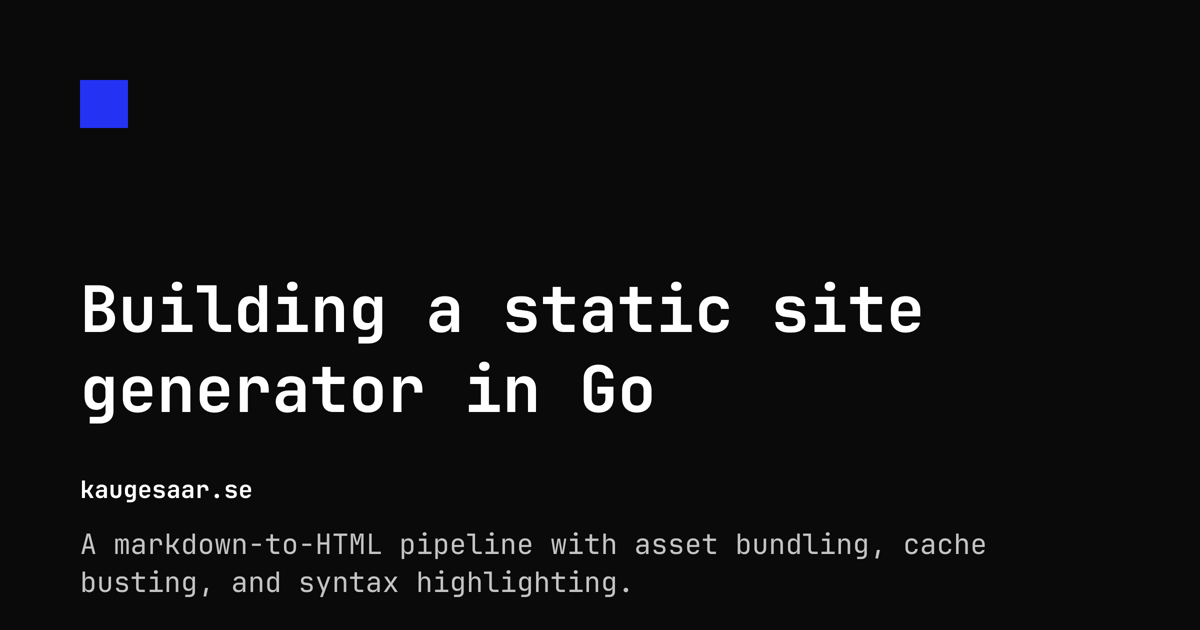
No Figma, no Canva, no manual step. Write a post, run the build, get an image.
Was it worth it?
Objectively? No. Hugo would do everything I need and more. But building this taught me things I wouldn’t have learned otherwise:
- How cache busting actually works end-to-end, from hashing bytes to setting headers
- How goldmark’s AST transformer API lets you rewrite content at the tree level
- How little code a static site generator actually needs
The whole thing compiles in under a second and builds the site in about 50ms. There are no node_modules, no config files for the config files, no plugins. Just Go, some markdown, and a config.yaml.
Sometimes the best tool is the one you understand completely.